Saturday, January 1, 2011

Posted by SAMAJ SHEKHAR

0

Serializing and Deserializing Data from Json to .Net Objects. ( Example Facebook Feeds)


A very very Happy New Year to you all. I thought why not start this year with a nice blog post, so here i am with a post on how to Deserialize data from Json to a .Net Object and back again.Many libraries exist for this Job most notabely the Json.Net and Dynamic Rest library by Nikhil Kothari

But developer community has always asked why microsoft didn't have it in the Frame work. Well now they have one. It comes in frame work now with an added dll of "System.Web.Extentions.dll". That provides us the Class JavascriptSerializer which you can use by including a using statement as follows.

using System.Web.Script.Serialization;

Before going into the code, let us first understand what is JSON, and what is its significance in the modern world of web applications.

What is JSON?

JSON is another format of expressing data, just like XML. But, JSON is very simpler than XML, and tiny than XML. So, it is becoming popular in the web world to choose the JSON notation over XML since JSON notation are usually shorter, and less data to be transmitted if at all they were to be.

A Simple Example

So lets understand this process with an example, since i am currently working on a project which uses facebook to query data, i think this will be helpful to the facebook developer community also. So first you need to define a class that matches the JSON object you are receiving. like a class if a Data in Json looks like below.

{
"obj1":"data",
"obj2":"10004",
"obj3":{
      "subobj1":"data",
      "subobj2":"data"
      }
"obj4":"data"
}

Then the corresponding class for that in .Net will be

public class MyObj1
{
    public string     obj1 { get; set; }
    public int        obj2 { get; set; }
    public MyObj2     obj3 { get; set; }
    public string     obj4 { get; set; }
}

public class MyObj2
{
    public string subobj1 { get; set; }
    public string subobj2 { get; set; }
}

Notice The obj3 in Json is a completely different class as it contains sub fields so a different class fo that in .Net. Also Remember JavascriptSerializer uses reflections to match field or property "names" with that in "Json" so be careful.

Now to deserialize above Json data to the .Net classes juat include the following line.

JavaScriptSerializer sr = new JavaScriptSerializer();
string jsondata = /*your json string here*/;
//Now with this line the Json string will be converted in MyObj1 object type
MyObj1 converted = sr.Deserialize<MyObj1>(jsondata);
Facebook Example (Deserializing Facebook Feeds)

Now the data returned by facebook's Graph API is also in Json and below is an sample data returned by

http://graph.facebook.com/samajshekhar/feed?limit=1

{
   "data": [
      {
         "id": "100000570310973_182862925076050",
         "from": {
            "name": "Samaj Shekhar",
            "id": "100000570310973"
         },
         "message": "#Wow A decade has passed .. #Happy New year to every one....May this new  year be the most luckiest for you and every one.",
         "icon": "http://photos-d.ak.fbcdn.net/photos-ak-snc1/v27562/23/2231777543/app_2_2231777543_9553.gif",
         "actions": [
            {
               "name": "@samajshekhar on Twitter",
               "link": "http://twitter.com/samajshekhar?utm_source=fb&utm_medium=fb&utm_campaign=samajshekhar&utm_content=20985773201301504"
            }
         ],
         "type": "status",
         "application": {
            "name": "Twitter",
            "id": "2231777543"
         },
         "created_time": "2010-12-31T23:32:54+0000",
         "updated_time": "2010-12-31T23:32:54+0000"
      }
   ],
   "paging": {
      "previous": "http://graph.facebook.com/samajshekhar/feed?limit=1&since=2010-12-31T23%3A32%3A54%2B0000",
      "next": "http://graph.facebook.com/samajshekhar/feed?limit=1&until=2010-12-31T23%3A32%3A53%2B0000"
   }
}

Don't get confused its just little more data of different types including arrays. ( To get data from facebook you can use System.Net.HttpWebRequest and System.Net.HttpWebResponse class). So Now the equivalent .Net classes will be as follows.

Note:

I have included only the classes needed for the above feed for a complete class that accommodate all fields returned in feed with and without access token can be found here at

http://thesharepage.codeplex.com/SourceControl/changeset/view/5405#100657

public class FacebookFeedsWithoutToken
{
 public FacebookFeedWithoutToken[] data { get; set; }
 public ReturnedDataPaging paging { get; set; }
}

public class FacebookFeedWithoutToken
{
 public string id { get; set; }
 public NameIdPair from { get; set; }
 public string message { get; set; }
 public Uri icon { get; set; }
 public NameLinkPair[] actions { get; set; }
 public string type { get; set; }
 public NameIdPair application { get; set; }
 public DateTime created_time { get; set; }
 public DateTime updated_time { get; set; }
}

public class NameIdPair
{
 public string name { get; set; }
 public string id { get; set; }
}

public class NameLinkPair
{
 public string name { get; set; }
 public Uri link { get; set; }
}

Now the classes are ready we just need to convert from json string to .Net object types. add the following line similar to above.

JavaScriptSerializer sr = new JavaScriptSerializer();
string jsondata = /*your json string here*/;
FacebookFeedsWithoutToken converted = sr.Deserialize<FacebookFeedsWithoutToken>(jsondata);

Thats all you have to do.

And once again Happy new year.

READ MORE - Serializing and Deserializing Data from Json to .Net Objects. ( Example Facebook Feeds)

Sunday, December 19, 2010

Posted by SAMAJ SHEKHAR

1”

Get current desktop theme


Recently i answered to a question at StackOverflow , where user wanted to know which desktp theme is currently is set on his computer. I thought that it could be a good post so i am posting that code here too.

What it simply does is that it looks for the Currently set theme in the windows registry and returns it as a string.

The current theme is stored in the CurrentTheme string in

HKEY_CURRENT_USER\Software\Microsoft\Windows\CurrentVersion\Themes

Following is the code:

using Microsoft.Win32;

public string GetTheme()
{
  string RegistryKey = @"HKEY_CURRENT_USER\Software\Microsoft\Windows\CurrentVersion\Themes";
  string theme;
  theme = (string) Registry.GetValue(RegistryKey, "CurrentTheme", string.Empty);
  theme = theme.Split('\\').Last().Split('.').First().ToString();
  return theme;
}
READ MORE - Get current desktop theme

Wednesday, December 15, 2010

Posted by SAMAJ SHEKHAR

1”

Creating a Facebook like badge


This a small walkthrough of how you can go about creating a Bage just like Facebook Badge.

Infact While developing my project i myself thought of creating a facebook like badge that can later be saved on the server and used with a link to it. Following is the complete class code to generate the badge(Its also available on codeplex, and following is basically explaination of code there).

(Note: replace the"Image.FromFile(@"C:\Users\SHEKHAR\Desktop\Test HTML\tsp1.png");" with a path to image that can be used as a title bar in the badge.)

The Badge Class

First Declare the Class and some variables to hold on required information. (made it sealed so it couldn't be inherited).

public sealed class TSPBadge
{
 /// <summary>
 /// Image for the TSP badge's title bar (Static Field)
 /// </summary>
 private static Image TSPBadgeTitleBar = Image.FromFile(@"C:\Users\SHEKHAR\Desktop\Test HTML\tsp1.png");

 /// <summary>
 /// The Default Width for TSP Badge (Constant Field)
 /// </summary>
 public const int DBadgeWidth = 300;

 /// <summary>
 /// The Default Height for TSP Badge (Constant Field)
 /// </summary>
 public const int DBadgeHeight = 500;

 /// <summary>
 /// Set this variable to true if a TSP badge has been successfully made
 /// </summary>
 public bool IsMade = false;

 /// <summary>
 /// Initializes the static members of the TSPBadge Class (Static Constructor)
 /// </summary>
}
Class Constructors

Now lets define both static and instance constructors.

/// <summary>
/// Initializes the static values of TSPBadge with default values
/// </summary>
static TSPBadge()
{
BadgeWidth = DBadgeWidth;
BadgeHeight = DBadgeHeight;
}

/// <summary>
/// Initializes a new Instance of TSPBadge with default values
/// </summary>
public TSPBadge()
{
 IsMade = false;
 UserPic = null;
 UserName = null;
 EmailID = null;
 UserStatus = null;
}

/// <summary>
/// Initializes a new Instance of TSPBadge with specified Width and Height
/// </summary>
/// <param name="Width">The Width for the TSP Badge</param>
/// <param name="Height">The Height for the TSP Badge</param>
public TSPBadge(int Width, int Height)
{
 BadgeWidth = Width;
 BadgeHeight = Height;
}

/// <summary>
/// Initializes a new Instance of TSPBadge with specified Image, Name, Status and EmailID.
/// </summary>
/// <param name="userpic">The user's picture</param>
/// <param name="username">The name of the user</param>
/// <param name="emailID">The user's EmailID</param>
/// <param name="userstatus">The user's most recent status text</param>
public TSPBadge(Image userpic, string username, string emailID, string userstatus)
{
 IsMade = false;
 UserPic = new Bitmap(userpic);
 UserName = username.ToUpper(CultureInfo.InvariantCulture);
 EmailID = emailID;
 UserStatus = userstatus;
}
Properties

Following are defination of some properties that will help you to alter the settings when required.

/// <summary>
/// Gets or Sets the Width to be used for drawing TSP badge. (Static Property)
/// </summary>
public static int BadgeWidth { get; set; }

/// <summary>
/// Gets or Sets the Height to be used for drawing TSP badge. (Static Property)
/// </summary>
public static int BadgeHeight
{
 get
 {
  return _BadgeHeight;
 }
 set
 {
  GraphicsUnit gu = GraphicsUnit.Pixel;
  //The TSP Badge's Minimum height is the height of TSP TitleBar's height
  if (value <= (int)TSPBadgeTitleBar.GetBounds(ref gu).Height)
  {
   _BadgeHeight = (int)TSPBadgeTitleBar.GetBounds(ref gu).Height;
  }
  else
  {
   _BadgeHeight = value;
  }
 }
}
private static int _BadgeHeight;

/// <summary>
/// Gets or Sets the User Picture to be used for drawing TSP Badge
/// </summary>
public Bitmap UserPic { get; set; }

/// <summary>
/// Gets or Sets the User Name to be used for drawing TSP Badge
/// </summary>
public string UserName { get; set; }

/// <summary>
/// Gets or Sets the User EmailID to be used for drawing TSP Badge
/// </summary>
public string EmailID { get; set; }

/// <summary>
/// Gets or Sets the User's Status text to be used for TSP Badge
/// </summary>
public string UserStatus { get; set; }
Methods for drawing

Lets draw the badge!

/// <summary>
/// Draws a TSP Badge on bitmap with specified Image, Name, Status and EmailID. (Static Method)
/// </summary>
/// <param name="userpic">The user's picture</param>
/// <param name="username">The name of the user</param>
/// <param name="emailID">The user's EmailID</param>
/// <param name="userstatus">The user's most recent status text</param>
/// <returns>Returns an  TSP Badge as an Bitmap Image</returns>
public static Bitmap MakeBadge(Image userpic, string username, string emailID, string userstatus)
{
 Bitmap bmp = new Bitmap(BadgeWidth, BadgeHeight);
 Graphics gf = Graphics.FromImage(bmp);
 GraphicsUnit gu = GraphicsUnit.Pixel;
 string BatchString = String.Format("{0}\n\nEMAIL:  {1}\n\nSTATUS:  {2}", username.ToUpper(CultureInfo.InvariantCulture), emailID, userstatus);
 //We are taking 60% of the bitmap space for User picture - (int)((float)BadgeHeight * (60F / 100F))
 //Write status, name etc in rest of 40% bitmap space
 float PicPer = 60F;
 float RstPer = 100F - PicPer;
 gf.Clear(Color.White);
 gf.DrawImage(userpic, new Rectangle(2, 2, BadgeWidth - 4, (int)((float)BadgeHeight * (PicPer / 100F)))); //NOTE: The rectangle here takes a non-zero based width/height so 300
 gf.DrawImage(TSPBadgeTitleBar, new Rectangle(0, 0, BadgeWidth, (int)TSPBadgeTitleBar.GetBounds(ref gu).Height));
 //TODO: Insert code to check name dosen't go out of title bar and get trimmed
 gf.DrawString(username.ToUpper(CultureInfo.InvariantCulture), new Font(new FontFamily("Arial"), 10F), Brushes.White, new PointF(5, 6));
 gf.DrawRectangle(Pens.Black, 0, 0, BadgeWidth - 1, BadgeHeight - 1); //NOTE: DrawRectangle takes a 0 based width/height so 300-1
 gf.DrawRectangle(Pens.Black, 1, 1, BadgeWidth - 3, ((int)((float)BadgeHeight * (PicPer / 100F))) + 1);
 gf.DrawRectangle(Pens.Black, 1, ((int)((float)BadgeHeight * (PicPer / 100F))) + 3, BadgeWidth - 3, ((int)((float)BadgeHeight * (RstPer / 100F))) - 5);
 gf.DrawString(BatchString, new Font(new FontFamily("Arial"), 10F), Brushes.Black, new RectangleF(5, ((int)((float)BadgeHeight * (PicPer / 100F))) + 6, BadgeWidth - 7, ((int)((float)BadgeHeight * (RstPer / 100F))) - 5), StringFormat.GenericTypographic);
 return bmp;
}

Now lets add some more methods in the class to make the MakeBadge static method accessible to instance methods and customizable too.

/// <summary>
/// Draws a TSP Badge on bitmap.
/// <para>NOTE: This function requires that all the requiremens are set already other wise it returns a null bitmap</para>
/// </summary>
/// <returns>Returns an  TSP Badge as an Bitmap Image</returns>
public Bitmap GetBadge()
{
 IsMade = false;
 Bitmap bmp = null;
 if (UserPic != null && UserName != null && EmailID != null && UserStatus != null)
 {
  bmp = TSPBadge.MakeBadge(UserPic, UserName, EmailID, UserStatus);
  IsMade = true;
 }
 return bmp;
}

/// <summary>
/// Draws a TSP Badge on bitmap with specified Image, Name, Status and EmailID.
/// </summary>
/// <param name="userpic">The user's picture</param>
/// <param name="username">The name of the user</param>
/// <param name="emailID">The user's EmailID</param>
/// <param name="userstatus">The user's most recent status text</param>
/// <returns>Returns an  TSP Badge as an Bitmap Image</returns>
public Bitmap GetBadge(Image userpic, string username, string emailID, string userstatus)
{
 IsMade = false;
 UserPic = new Bitmap(userpic);
 UserName = username.ToUpper(CultureInfo.InvariantCulture);
 EmailID = emailID;
 UserStatus = userstatus;
 Bitmap bmp = TSPBadge.MakeBadge(UserPic, UserName, EmailID, UserStatus);
 IsMade = true;
 return bmp;
}

That's all Happy Coding :)

READ MORE - Creating a Facebook like badge

Tuesday, October 12, 2010

Posted by SAMAJ SHEKHAR

0

IE9 is here, So.. what's in for you as a Developer


After so many years of developers wishing for a better browser from Microsoft, one that was more consistent with web standards and would allow them to develop cross-browser websites leveraging the same markup, today marks the day that developers finally have that browser; Internet Explorer 9 Beta. It’s an important day because this release, although just a beta, is the culmination of a lot of effort and most importantly, listening, by the Internet Explorer team.
While the Internet Explorer browser has enjoyed widespread adoption by consumers, it hasn’t always been viewed fondly by the development community. The important work of building cross-browser compliant websites has often been cumbersome, due in part to differing interpretations of browser APIs in previous versions of Internet Explorer. The differences forced developers, myself included, to find workarounds for functionality that, in many cases, had a clearly defined standard behavior.

HTML5, CSS3, DOM

With Internet Explorer 9, there’s been a concerted effort by Microsoft to focus on standards-based functionality that will ease cross-browser development while providing the features needed to build rich and immersive websites. Take, for example, IE9’s support for many of the features of HTML5 and CSS3, the specifications which are defining the future of the web. By including support for features such as Canvas, video, @font-face, CSS3 media queries, SVG and many others, we now have a rich base to provide more compelling experiences to end users. In addition, by ensuring that these features are conformant to the defined specifications, the sites we build should work with any browser that also supports those specifications.
To take it a step further, the IE team has enhanced the performance of many of the new HTML5 features by taking advantage of the GPU. This means that text, graphics and video will be substantially smoother and more responsive allowing websites to perform more like true applications.
And at the DOM level, important changes have been made to be consistent with the defined specifications making it easier to whittle down browser-specific code. For example, support for the W3C DOM Events specification (addEventListener & removeEventListener) in place of the proprietary IE model (attacheEvent & detachEvent) has been one of the most welcomed changes to IE9 as has the introduction of getElementsByClassName, supported for some time in the DOM Level 2 specification and now available in IE9.

JavaScript

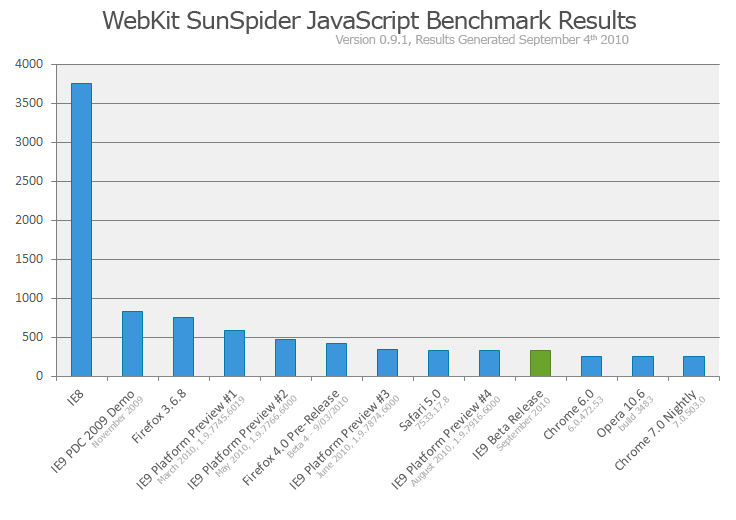
Equally important is the performance boost provided by the new Chakra JavaScript engine which basically blows away older versions of Internet Explorer and brings IE9 in line with modern browsers such as Chrome, Firefox and Opera. JavaScript development continues to become more complex and intricate so the importance of these performance enhancements can’t be understated. The Chakra engine interprets, compiles, and executes code in parallel and takes advantage of multiple CPU cores when available and the results are obvious by the greatly improved benchmark scores from the Webkit Sunspider JavaScript Benchmarks.

Chakra JavaScript Engine – WebKit SunSpider Benchmarks

Updated Developer Tools

Substantial work has been done to update the Internet Explorer Developer Tools. The built-in tools, usually found by pressing F12, provided quite a bit of capabilities but were missing key components that were essential to effective testing and debugging of client-side source code. With this update, the tools now include a much anticipated network traffic inspector, Console tab, CSS editing, and an improved JavaScript profiler.
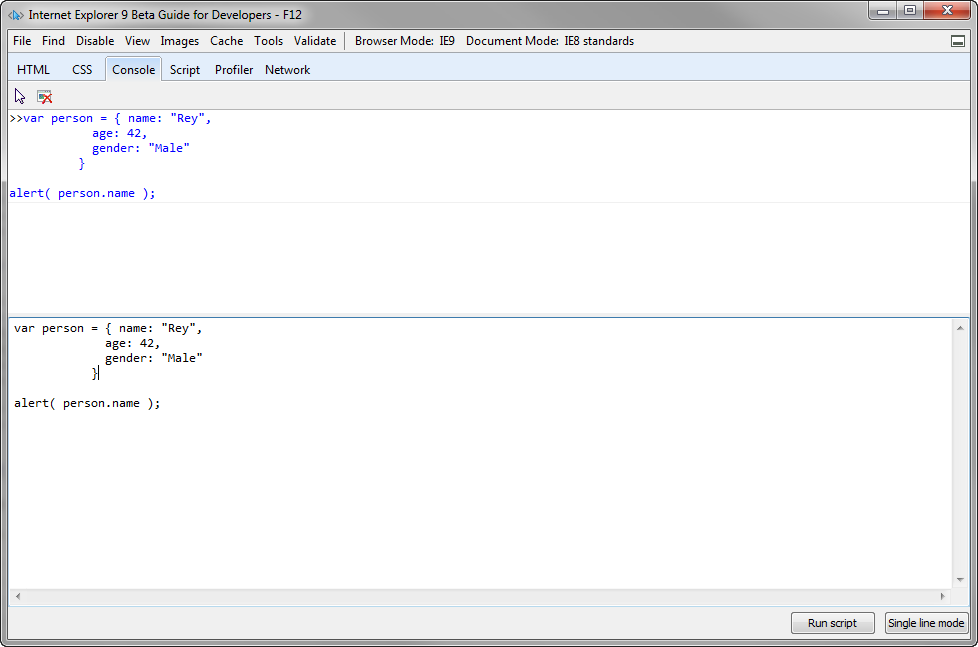
The new Console tab is a welcome addition providing the ability to inspect script easily as well as receive important page-specific error and warning messages.

IE Developer Tools – Console Tab
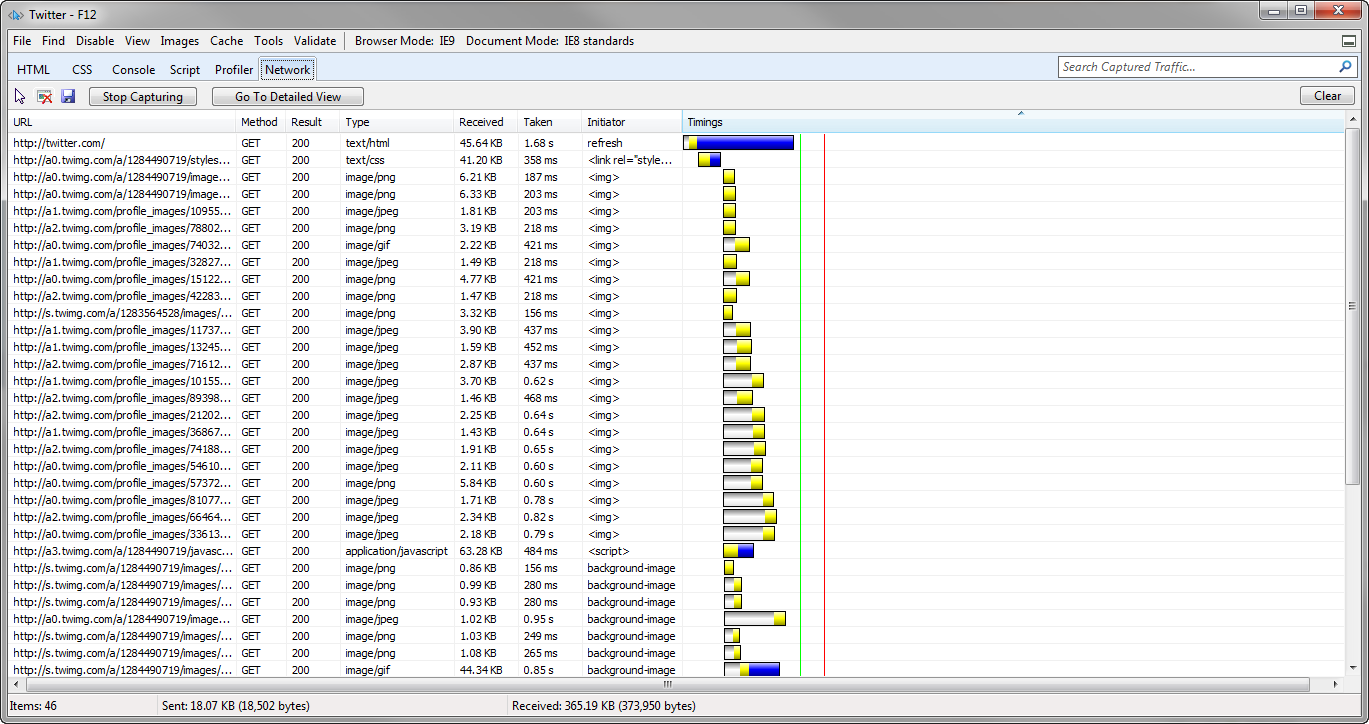
Of the new features, the one that I’m most excited about is the network traffic inspector, mainly because the bulk of my application development involves Ajax-based requests.

IE Developer Tools – Network Performance of Specific Assets

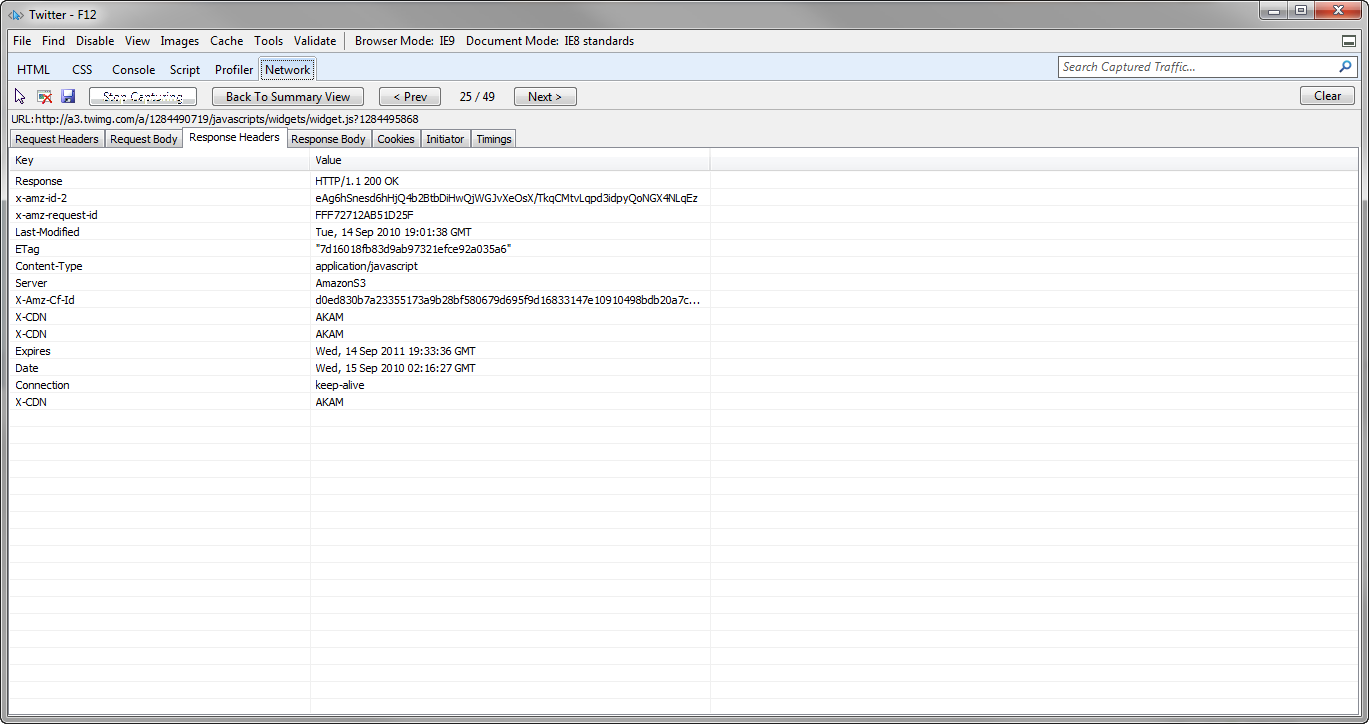
IE Developer Tools – Network Request Information
I can now do such things as determine load times of specific assets or inspect my request/response headers, cookies and return values without the need for breaking out of the browser to a 3rd party application such as Fiddler or Charles.

Get to Using it Today

A lot of effort has gone into making Internet Explorer 9 Beta a better browser. There’s certainly more work to be done but the fact that we now have a version of IE that provides standards-based functionality and allows us to use the same markup across browsers is pretty hot.
To really appreciate what you can build with IE9, though, you need to just start digging into it. Microsoft has created the following sites to give developers the knowledge and inspiration they need to leverage IE9 to its fullest:

  • Beauty of the Web – Explore all of the new features of Microsoft’s latest browser and check out the cool demos built using the advanced features of Internet Explorer 9 Beta
  • Internet Explorer 9 Test Drive – This site breaks down the new, advanced features of Internet Explorer 9 Beta and lets you get a visual of what’s possible with each bit of functionality
  • Internet Explorer Guide for Developers – The developer documentation you’ll need to learn how about the specifics of Internet Explorer 9 Beta


It feels great to know that we’re on a path to being able to build truly feature-rich websites that will be easier to maintain and provide a more exciting experience to users. While we’ll still need to support older browsers for some time, the fact that all the major browser vendors are heading in the same direction is going to allow us to build some truly amazing things. I can’t wait!

Post originally taken from Here
READ MORE - IE9 is here, So.. what's in for you as a Developer

Saturday, October 2, 2010

Posted by SAMAJ SHEKHAR

2

Silverlight or HTML5, Who wins!!!!


First sorry for being so late with my next post, i was little busy with my course project for NIIT. Secondly this post was supposed to be something about ADO.Net, but since i got my project , which has to be a web application, i myself was fiddling with the decision whether to use HTML5 or Silverlight for much   richer part of my application as now many browsers have started to support HTML5, even IE.

There is already a lot of fuss in Developer community on this topic. Every now and then, someone asks me, "Which technology will win: HTML5 or Silverlight?", or "What is Silverlight's strategy to compete with HTML5?".
I always have to take a deep breath before responding, because these questions presuppose something that doesn't make any sense to me. It's like asking a tool store owner, "Which will win, hammers or screwdrivers?", or "How will you prevent hammers from making screwdrivers obsolete?"

Black-and-white Thinking

Some important folks in the industry have argued that HTML5 is a Silverlight-killer, or that Silverlight exists to prevent HTML from advancing. These are dramatic claims that only heighten conflict in an industry afflicted by fictionalized Zarathustrian "black versus white" stories.

The Right Tool for the Job

Microsoft ships the world's most popular HTML client. Despite the HTML5 specification being a work in progress, we implemented several HTML5 features in our most recent browser. Microsoft has co-chaired the HTML5 working group in W3C since its inception, and we remain active participants. And our browser will continue to be the dominant HTML standards implementation for the foreseeable future.
Likewise, we continue to invest heavily in Silverlight development and deployment. If Silverlight and HTML are mortally opposed, as the story goes, we must be crazy to invest so heavily in both, right? Wrong.
The truth is, Microsoft is a developer company, and there is no one-size-fits-all, perfect tool for every development job. Can anyone seriously criticize us for investing in C#, JavaScript, and Ruby and Python (among other languages)? No! Our customers should be able to use the right tool for the job at hand.
As with development languages, there is no single development platform for every job. HTML5 will be fantastic for some scenarios, while Silverlight will be great for others. Besides Internet Explorer and Silverlight, we ship a bunch of other platforms, including XNA and DirectX for game developers, WPF and .NET, Win32, and others. We have the depth and breadth to be best in class, no matter what platform developers want to use.

Opportunism vs. Reality

So, why do certain people propagate this myth? Do they really want a monoculture world where there is only one platform for every job? Or are they truly arguing from an idealistic or religious viewpoint, as some of their arguments would suggest?
In my opinion, it's a lot simpler than all of that: those who argue that HTML5 will supplant everything else tend to be companies who have nothing else. If you only sell hammers, you might as well try to convince people that there are no such things as screws. And you can drive awareness for your newly-incorporated hammer store by telling tales of intrigue and conflict between hammers and screwdrivers. But the fact that these arguments are often couched in conspiracy theories or ideology, suggests that they are primarily opportunistic marketing ploys, and not motivated by pragmatic technical reality.

What do you think? Leave a comment below, or hit me up on twitter.

Originally Taken from here.
READ MORE - Silverlight or HTML5, Who wins!!!!